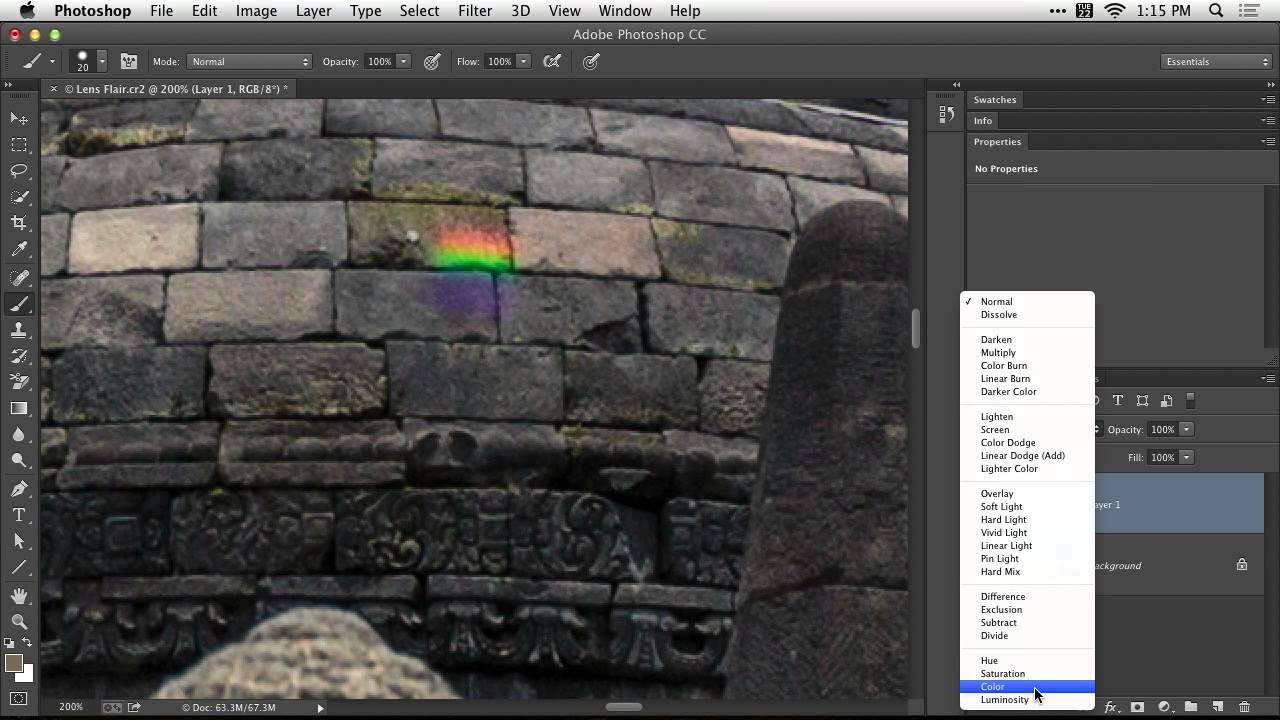
How to Paint Out Lens Flare in Photoshop Using Color Blend Mode (No Messy Selections Required)

How to Paint Out Lens Flare in Photoshop Using Color Blend Mode (No Messy Selections Required)

Lens flare is one of those problems that looks almost unfixable after the fact. You’re shooting into the light, the sun clips your front element, and suddenly there’s a smear of color across your subject that has nothing to do with the actual scene. I’ve lost more than a few otherwise solid shots to it, especially shooting outdoors with budget glass that doesn’t have the best coatings. Most of the quick fixes I’ve tried either smear the detail underneath or leave an obvious patch where the texture goes flat.

Stop Making Lens Flares Look Fake: A Photoshop Technique That Actually Works

Stop Making Lens Flares Look Fake: A Photoshop Technique That Actually Works

Lens flares are one of those effects that photographers either overuse into oblivion or avoid entirely because they’ve seen too many bad examples. I’ve been guilty of both. The overuse phase hit me hard around year two of shooting, and the avoidance phase lasted a lot longer than it should have. What changed my mind was stumbling across a technique that treats the lens flare not as a gimmick slapped on top of a photo, but as a lighting tool that earns its place in the image.